ip
Tecna User Guide
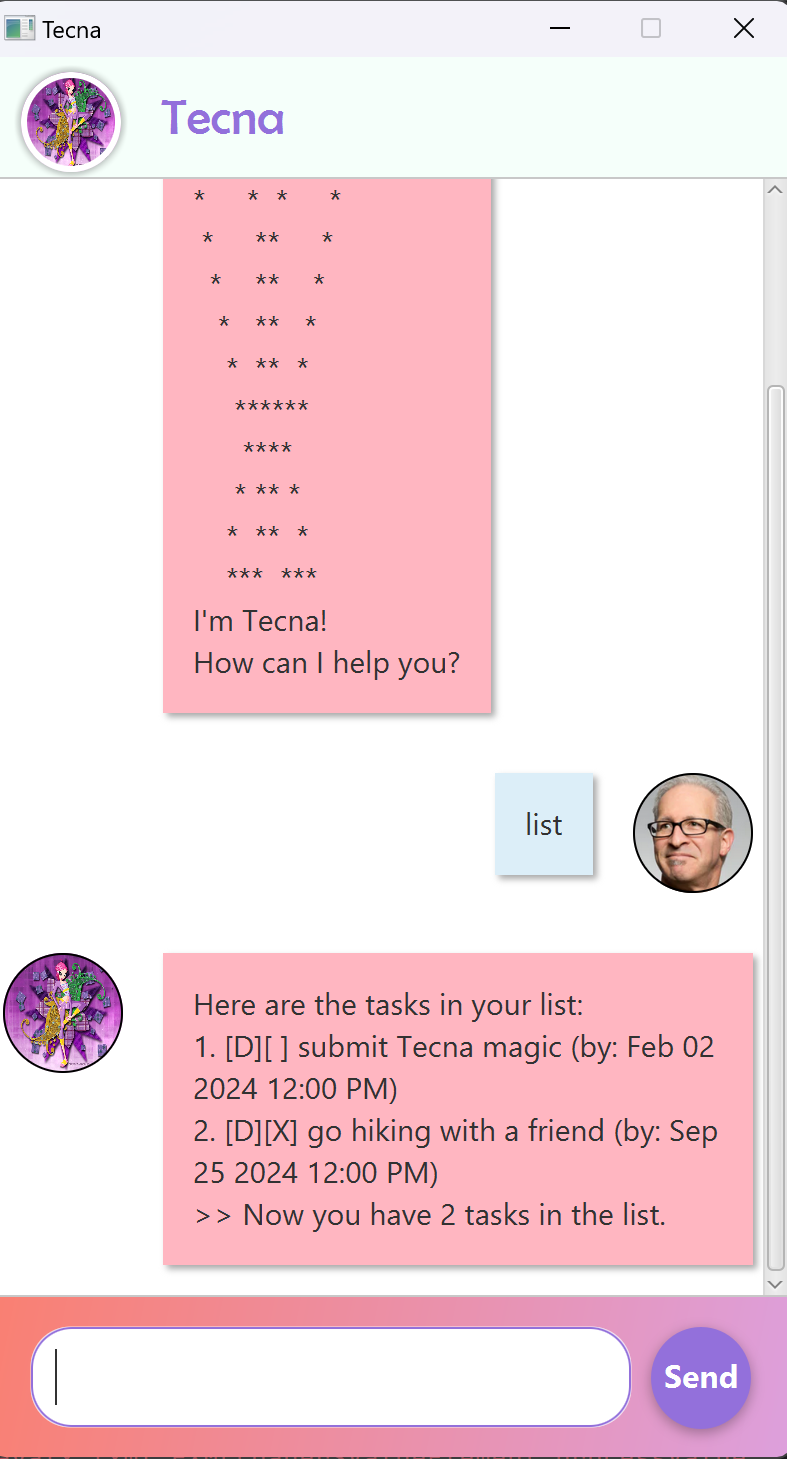
Tecna is one of the main characters in Winx Club, originating from the planet Zenith, a highly advanced world focused on technology and logic. As the Fairy of Technology, Tecna possesses unique abilities that allow her to control and manipulate digital systems, reflecting her sharp intellect and analytical mind.
Getting the inspiration from our talented fairy, Tecna chatbot promises to simplify and streamline task management in your everyday life. Whether you’re juggling work assignments, personal errands, or project deadlines, Tecna offers an intuitive and user-friendly interface to help you stay organized and productive.
Features
Things to note
- There are 3 types of task:
- todo Task: The task without any deadline.
- deadline Task: The task with deadline.
- event Task: The task with starting time and ending time.
- Date and time format Deadlines, starting times and ending times must be all entered under the format of
yyyy-MM-dd HHmm- Items inside the square brackets [] (e.g., [task name], [deadline of task in yyyy-MM-dd HHmm]) are the information required user input.
Adding a task
Adds a new task to the list of tasks.
Command format:
- ToDo task:
todo [task name] - Deadline task:
deadline [task name] /by [deadline of task in yyyy-MM-dd HHmm] - Event task:
event [task name]
Example:
todo prepare for the magic meetingdeadline submit a magic formula to Professor Winx /by 2024-09-20 2359event attend flying training /from 2024-09-16 1600 /to 2024-09-16 1900
Listing all tasks
Lists all the tasks in the list in the order of adding into the list.
Command format: list
Searching
Searches any tasks that contain the specified keyword in the task name.
Command format: find [keyword]
NOTE: A valid keyword contains only 1 word.
Example: find magic returns
Here are the matching tasks in your list:
1. [T][ ] prepare for the magic meeting
2. [D][ ] submit a magic formula to Professor Winx (by: 20 September 2024 11:59 PM)
Mark a task as Done
Marks a task with the corresponding index number as done.
Command format: mark [index number]
Unmark a task
Unmarks the done-status of the task with the corresponding index number.
Command format: unmark [index number]
Delete a task
Deletes a task by the index number in the application task list.
Command format: delete [index number]
Example: delete 1 will delete the first task in the list and shift the subsequent tasks up.
TIP: You should use the
listcommand to see the index of the task you want to delete.
Exit Tecna
Closes the Tecna chatbot’s window and quits the program.
Command format: bye
Saving the data
Your input data will be automatically saved in the program’s disk.
Command Summary
| Action | Format, Examples |
|---|---|
| Add a ToDo task | todo [task name]e.g., todo go to the Tec-magic school |
| Add a Deadline task | deadline [task name] /by [deadline yyyy-MM-dd HHmm]e.g., deadline submit the Tec-gic assignment /by 2024-09-16 1300 |
| Add an Event task | event [task name] /from [start yyyy-MM-dd HHmm] /to [end yyyy-DD-mm HHmm]e.g., event join a casual Tec-dance /from 2024-09-20 1300 /to 2024-09-20 1500 |
| List | list |
| Find | find [keyword]e.g., find school |
| Mark | mark [index number]e.g., mark 2 |
| Unmark | unmark [index number]e.g., unmark 2 |
| Delete | delete [index number]e.g., delete 2 |
| Bye | bye |
Acknowledgement
- Tecna’s Avatar: Wallpaper Flare
- User’s Avatar: Adapted from SE-EDU JavaFX Tutorial
- json-simple (third-party library): Google Code